|
|
AFractal |
|
| Introduction | |||||||
| |||||||
|
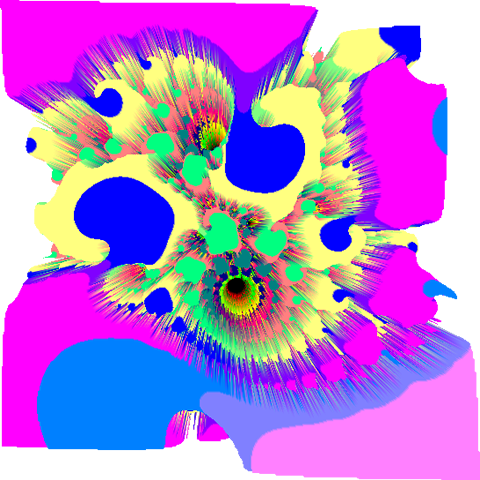
It has several features those create fractal pictures (data), play fractal sounds, show fractals in 3D and show maps overlaid with a fractal picture. It also can create fractal pictures (data) in the background. |
||||||
| Screenshot | ||
| ||
|
||
| ||
|
|
|
| ||
|
||
| Download | ||||||||||||||
| ||||||||||||||
|
AFractal ver.1.1.3 | |||||||||||||
| ||||||||||||||
|
|
|
||||||||||||
| ||||||||||||||
|
AFractal Demo ver.1.1.3 | |||||||||||||
| ||||||||||||||
|
|
|
||||||||||||
| How to Use | |
| |
|
Tips |
| |
|
Manual |
| |
|
Gallery |
| Features | |||
| |||
|
Orientation | ||
| |||
|
|
AFractal supports both of portrait and landscape orientation in booting. You can also change the orientation after booting. |
|
| |||
|
Booting from data file (.xml) | ||
| |||
|
|
You can boot AFractal from data file (.xml) with "Download" feature of "Browser" or "Open" feature of some "File Manager". | |
| |||
|
Fractal Picture (Data) (Gallery is here) | ||
| |||
|
|
You can create a fractal picture, save it to a file (.png) and save it as a wallpeper. You can also save its settings to a file (.xml). |
|
| |||
|
Fractal Sound (Gallery is here) | ||
| |||
|
|
You can create a fractal sound and save it to a file (.mid). You can also set a phone ringtone it. |
|
| |||
|
Sound Server on PC (AFractal Sound Server) | ||
| |||
|
|
Your PC can play fractal sounds that AFractal is creating live. You only boot "AFractal Sound Server" on your PC and connect it to a network that can use WIFI. |
|
| |||
|
Fractal in 3D | ||
| |||
|
|
AFrctal can show a fractal data in 3D.
You can save "3D Picture" to a file (.png) and save it as a wallpeper. |
|
| |||
|
Cellular Automata (Gallery is here) | ||
| |||
|
|
You can also create an anothere fractal picture with fractal data, save it to a file (.png) and save it as a wallpeper. |
|
| |||
|
Map overlaid with Fractal Picture | ||
| |||
|
|
AFrctal can show a map overlaid with a fractal picture. That is a collaboration of a fractal picture and a satellite photograph. |
|
| |||
|
Rendering Service | ||
| |||
|
|
You can create fractal pictures(data) in the background. If you set rendering service before going to bed, you can see a beautiful? or funny? fractal picture in the next morning. |
|
| |||
|
Picture Widget (beta) | ||
| |||
|
|
This widget show the whole or part of a sample picture (data). If you tap on a picture, "Boot AFractal's Rendering Service" butoon will appear. |
|
| Bugs | ||||
| ||||
|
3D View | |||
| ||||
|
|
java.lang.OutOfMemoryError (Full Screen, Heigh Resolution or...) | ||
| ||||
|
|
|
The cause is under investigation. (Memory leak of Open GL?) |
|
| ||||
|
|
|||
| ||||
|
|
|
||
| ||||
|
|
|
|
|
| ||||
|
|
|||
| ||||
|
|
|
||
| ||||
|
|
|
|
|
| Notes | ||||
| ||||
|
Demo Version Limitations | |||
| ||||
|
|
Following some features are not implemented. | ||
| ||||
|
|
|
- Save data to file (.xml) - Save picture to file (.png) - Save picture as wallpaper - Save sound to file (.mid) - Save 3D picture to file (.png) - Save 3D picture as wallpaper - Save Cellular Automata picture to file (.png) - Save Cellular Automata picture as wallpaper |
|
| Change Log | ||
| ||
|
Full, Demo Version 1.1.3 - 2010.9.30 (Japan/Yokohama GMT+9:00) | |
| ||
|
|
- Fixed Bug in taking in and out the external keyboard - Fixed Bug in relation to "Color Values Settings" |
| ||
|
Full, Demo Version 1.1.2 - 2010.6.4 (Japan/Yokohama GMT+9:00) | |
| ||
|
|
- Builded with Android 2.2 (Support for Android 1.5, 1.6, 2.0, 2.0.1, 2.1, 2.2) |
| ||
|
Full, Demo Version 1.1.1 - 2010.4.18 (Japan/Yokohama GMT+9:00) | |
| ||
|
|
- Added "Japanese Locale" - Fixed Bug in relation to "Preferences of Map View" and Improved it |
| ||
|
Full, Demo Version 1.1 - 2010.3.21 (Japan/Yokohama GMT+9:00) | |
| ||
|
|
- Added Feature of rotating object with touching and draging in 3D View - Added Feature of moving object up and down in 3D View - Added Feature of changing "View Point (Camera)" and "Point of Gaze" distance in 3D View - Added Preferences :: 3D View pre-settings - Fixed Bug in relation to "Advanced Data Settings" |
| ||
|
Full, Demo Version 1.0.9 - 2010.3.3 (Japan/Yokohama GMT+9:00) | |
| ||
|
|
- Fixed Bug in relation to "Making Color Table" - Fixed Bug of poor graphics on Android 1.5 - Fixed Bug of defects that some dialogs' title character are displayed lack on Android 2.* |
| ||
|
Full, Demo Version 1.0.8 - 2010.2.4 (Japan/Yokohama GMT+9:00) | |
| ||
|
|
- Fixed Bug in relation to "Advanced Data Settings" - Fixed Bug in relation to "Sound Server Settings" |
| ||
|
Full, Demo Version 1.0.7 - 2010.1.24 (Japan/Yokohama GMT+9:00) | |
| ||
|
|
- Builded with Android 2.1 (Support for Android 1.5, 1.6, 2.0, 2.0.1, 2.1) - Fixed Bug in relation to "Cellular Automata View" - Fixed Bug in relation to "Quick Magnifying" - Improved "Rendering Thread" - Added Feature of booting from data file (.xml) |
| ||
|
Full, Demo Version 1.0.6 - 2010.1.9 (Japan/Yokohama GMT+9:00) | |
| ||
|
|
- Added Cellular Automata View - Fixed Bug in relation to "Rendering Size" |
| ||
|
Full, Demo Version 1.0.5 - 2009.12.25 (Japan/Yokohama GMT+9:00) | |
| ||
|
|
- Builded with Android 2.0.1 (Support for Android 1.5, 1.6, 2.0, 2.0.1) - Added Support for "Additional Screen Resolutions" - Changed Graphics - Added Data :: Rendering Size - Added Preferences :: Rendering Size Default - Improved 3D view - Changed 3D View :: Title Bar - Added 3D View :: Status Bar - Added 3D View :: Save 3D Picture (.png) - Added 3D View :: Save 3D Picture as Wall Paper - Improved Picture Widget (beta) |
| ||
|
Full, Demo Version 1.0.4 - 2009.12.5 (Japan/Yokohama GMT+9:00) | |
| ||
|
|
- Improved Playing Sound - Improved Saving Sound (.mid) - Added Sound :: Mode :: Instrument Shuffle (Polyphony) + Percussion Shuffle |
| ||
|
Full, Demo Version 1.0.3 - 2009.11.28 (Japan/Yokohama GMT+9:00) | |
| ||
|
|
- Added Sound :: Mode :: Monophony, Polyphony and others - Moved "Sound :: Instrument :: 999. Percussions" to "Sound :: Mode :: Percussion Shuffle" - Fixed Bug in relation to "Rendering Default" |
| ||
|
Full, Demo Version 1.0.2 - 2009.11.21 (Japan/Yokohama GMT+9:00) | |
| ||
|
|
- Changed "Appli Icon" - Fixed Bug in relation to "Color Table" - Added Preferences :: Rendering - Added Preferences :: Color - Added Sound :: Direction :: Gravity |
| ||
|
Full, Demo Version 1.0.1 - 2009.11.9 (Japan/Yokohama GMT+9:00) | |
| ||
|
|
- Added Feature of playing "Fractal Sound" on PC over WIFI - Added Help :: Tips - Added Help :: Change Log |
| ||
|
Demo Version 1.0 - 2009.10.30 (Japan/Yokohama GMT+9:00) | |
| ||
|
|
- Initial release |
| ||
|
Full Version 1.0 - 2009.10.21 (Japan/Yokohama GMT+9:00) | |
| ||
|
|
- Initial release |
| Information | |||
| |||
|
[ All ] powered by Twitter |
||
| |||
|
|
||
|
|